Inventory Management Software Features for Small Business Teams
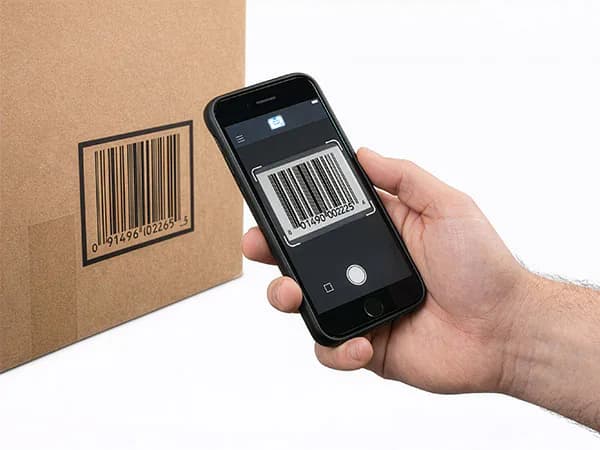
StockZip helps busy teams keep inventory accurate without slowing down the floor. Scan or find an item, choose the action, and let the app record the movement.
Simple flow
Scan, check in/out, done
Offline ready
Syncs when back online
Speed
Scan the item and choose the action. No searching through paper lists.
Accuracy
Fewer manual entries means fewer mistakes. Every change has a record.
Simplicity
The daily habit is easy to remember: scan, check in or out, done.
Core Features
The simple tools teams use to keep stock current.
Barcode Scanning
Find items quickly with a phone camera, Bluetooth scanner, USB scanner, or rugged scanner input.
Learn moreOffline Mobile Mode
Look up cached items and queue supported updates when the connection drops.
Learn moreCheck-In / Check-Out
Track custody by recording who has an item, when it left, and when it came back.
Learn moreBulk Actions
Move, tag, or delete selected inventory faster than editing one item at a time.
Learn moreLow Stock Visibility
Set minimum quantities and spot items that need attention before they become a stockout.
Learn moreLooking for something specific?
See all features below ↓
Everything Else You Need
All the features that make StockZip a complete inventory solution.
Folder hierarchy
Organize stock across warehouses, shelves, and bins as nested folders.
Custom fields
Add any data you need: serial numbers, warranty dates, etc.
Photo capture
Attach photos to items for visual identification.
QR code labels
Generate and print labels with QR codes for fast scanning.
Stock count / cycle counts
Run counts by location. See and fix discrepancies.
Activity audit trail
See who changed what and when. Full accountability.
Reports and analytics
Inventory value, low stock, movement history, and more.
Team roles and permissions
Control who can view, edit, or manage inventory.
CSV import/export
Bulk import from spreadsheets. Export anytime.
Tool Checkout System
Assign tools and equipment to people, crews, jobsites, or vans with a scan-based record.
Barcode & QR Tracking
Identify inventory, tools, and equipment with barcode or QR labels tied to item records.
Asset Tags & Labels
Generate and print QR and barcode labels from inventory already in StockZip.
Who Uses Real-Time Inventory Management Software?
Teams across industries use StockZip to track inventory, assets, and equipment.
Inventory Workflows Built for Daily Use
Practical inventory features for teams that need faster counts, clearer custody, and fewer manual updates.
Scan
Barcode and QR Workflows
Use phone cameras, labels, and supported scanners for daily stock work.
Track
Custody and Activity History
See who has each item, when it moved, and what changed over time.
Act
Low-Stock and Bulk Updates
Clean up selected records and spot items that need attention.
Why Not Just Use Spreadsheets?
Spreadsheets work until they don't. Here's what you're missing.
Spreadsheets
- No barcode scanning
- Manual data entry = typos
- No real-time sync
- No mobile-first experience
- No audit trail
StockZip
- Scan barcodes with your phone
- One-tap adjustments, no typing
- Real-time sync across devices
- Built for phones and tablets
- Append-only activity trail
See It In Action
Watch the 90-second demo or start free. Import your inventory and start scanning today.
- Free forever for 100 items
- No credit card required
- Label printing included
- CSV import included
Explore Barcoding Software for Inventory
See how StockZip fits your specific use case.
Questions small businesses ask before switching
Straight answers about spreadsheets, scanners, offline work, existing systems, and the free period.
StockZip supports three scanning methods: (1) Your phone camera for 1D barcodes and QR codes, (2) Bluetooth barcode scanners for faster high-volume scanning, and (3) Rugged Android devices with built-in hardware scanners like Zebra or Honeywell.