


Scanning a barcode with a phone
Scan with your phone

Count, move, and find stock with the camera already in your pocket. Works offline, syncs later.

Try the live demo →
Organized stock on shelves
Switching from Sortly?

Bring folders, photos, and history over in an afternoon — with pricing that stays predictable at renewal.

See pricing →
Folder-style inventory list
Free spreadsheet templates

Excel, Google Sheets, and printable count sheets — ready to download, no signup needed.

Get the templates →
Home › Features › Offline mobile scanning

An inventory app that works offline — scan now, sync when you reconnect

Warehouses, vans, basements, and jobsites do not always have signal. StockZip keeps offline barcode scanning and item lookup working from cached records, queues the updates you make, and syncs them the moment the device is back online. It is a queue-and-sync fallback, not a promise that everything works with no connection.

Start freeSee pricing

Free forever for 100 items · no credit card · queued updates sync on reconnect
stockzip.app
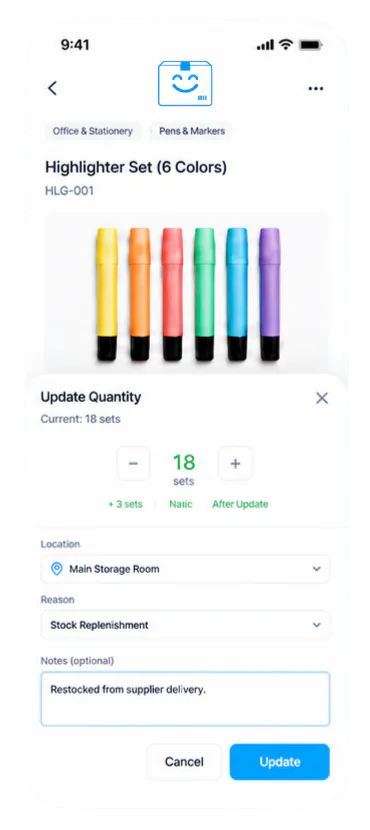
The StockZip mobile inventory app scanning an item from cached records while offline, with updates queued to sync

Scan and adjust from cached item data when signal drops; every supported change waits in a local queue and syncs the moment the phone reconnects.

Three steps, no setup project

How it works

01 · Open StockZip before you lose signal

Load the inventory your team needs while you still have a connection, so item data is cached on the device and available for offline lookup where supported.

02 · Scan and record through the dead zone

Use the mobile scanner or search to pull up cached items, then record supported work — quantity adjustments, check-outs, check-ins, and stock-count records. Each change queues locally instead of failing.

03 · Sync when the device reconnects

Back on signal, StockZip syncs the queued updates back to your account with their offline timing preserved. Live collaboration and integrations resume online, and any multi-device edits to the same item are there to review.

Everything you need in one place

Offline barcode scanning

Scan barcodes or QR codes to pull up cached item details when signal drops, so counting and lookups do not stall in the back of the warehouse.

Cached item lookup

Search records already on the device by barcode, SKU, name, folder, and status — the fields your team needs to identify stock without a connection.

Queued quantity & count work

Add, remove, or adjust stock and record counts during a scan session. Supported changes sit in a local queue and apply when the device is back online.

Check-in / check-out in the field

Queue supported check-outs and check-ins on the jobsite, then let the custody records sync back with everything else when you reconnect.

Timing preserved on sync

Queued updates carry their offline timing, so synced records reflect when the work actually happened — not just when the phone found signal again.

Honest connectivity boundaries

Live collaboration, integrations, and up-to-the-second shared data still need a connection. Offline is for keeping your own work moving, then reconciling on sync — reviewed, never silently merged.

Frequently asked questions

What inventory work actually works offline?
Offline supports cached item lookup, scan sessions, and queued supported updates — quantity adjustments, check-outs, check-ins, and stock-count records. Some workflows still need connectivity, including live collaboration, integrations, and any data that has not been cached on the device. It is a queue-and-sync fallback for keeping your own work moving, not a fully offline collaborative mode.
How does data sync when I go back online?
When the device reconnects, StockZip syncs the queued supported updates back to your account. Each synced record keeps timing context from the offline scan session, so the team can review what happened — and in what order — after connectivity returns.
What if two people edit the same item offline?
Live collaboration needs connectivity, so offline changes are not merged live. If more than one device records work against the same item while offline, those records are there to review once the devices reconnect rather than being combined silently. Sync regularly to keep that review small.
Does offline scanning work on both phones and tablets?
Yes. StockZip is built for mobile inventory work on phones and tablets, and offline support — cached lookup, scan sessions, queued updates, and later sync — works on both. How much you can do without a connection depends on the records cached on that device.
How long can I work offline before syncing?
That depends on the records cached on the device and the local storage available. There is no fixed timer, but syncing regularly is the honest recommendation: it keeps the team looking at current data and keeps the post-reconnect review short.

Keep exploring

All features →

Set up your inventory in an afternoon

Free for 100 items, no credit card, and your signup price is your renewal price.

Start freeSee pricing
Free for 100 items
No credit card
Start free