


Scanning a barcode with a phone
Scan with your phone

Count, move, and find stock with the camera already in your pocket. Works offline, syncs later.

Try the live demo →
Organized stock on shelves
Switching from Sortly?

Bring folders, photos, and history over in an afternoon — with pricing that stays predictable at renewal.

See pricing →
Folder-style inventory list
Free spreadsheet templates

Excel, Google Sheets, and printable count sheets — ready to download, no signup needed.

Get the templates →
Home › Features › Check-in / check-out

Check in check out software that shows who has what

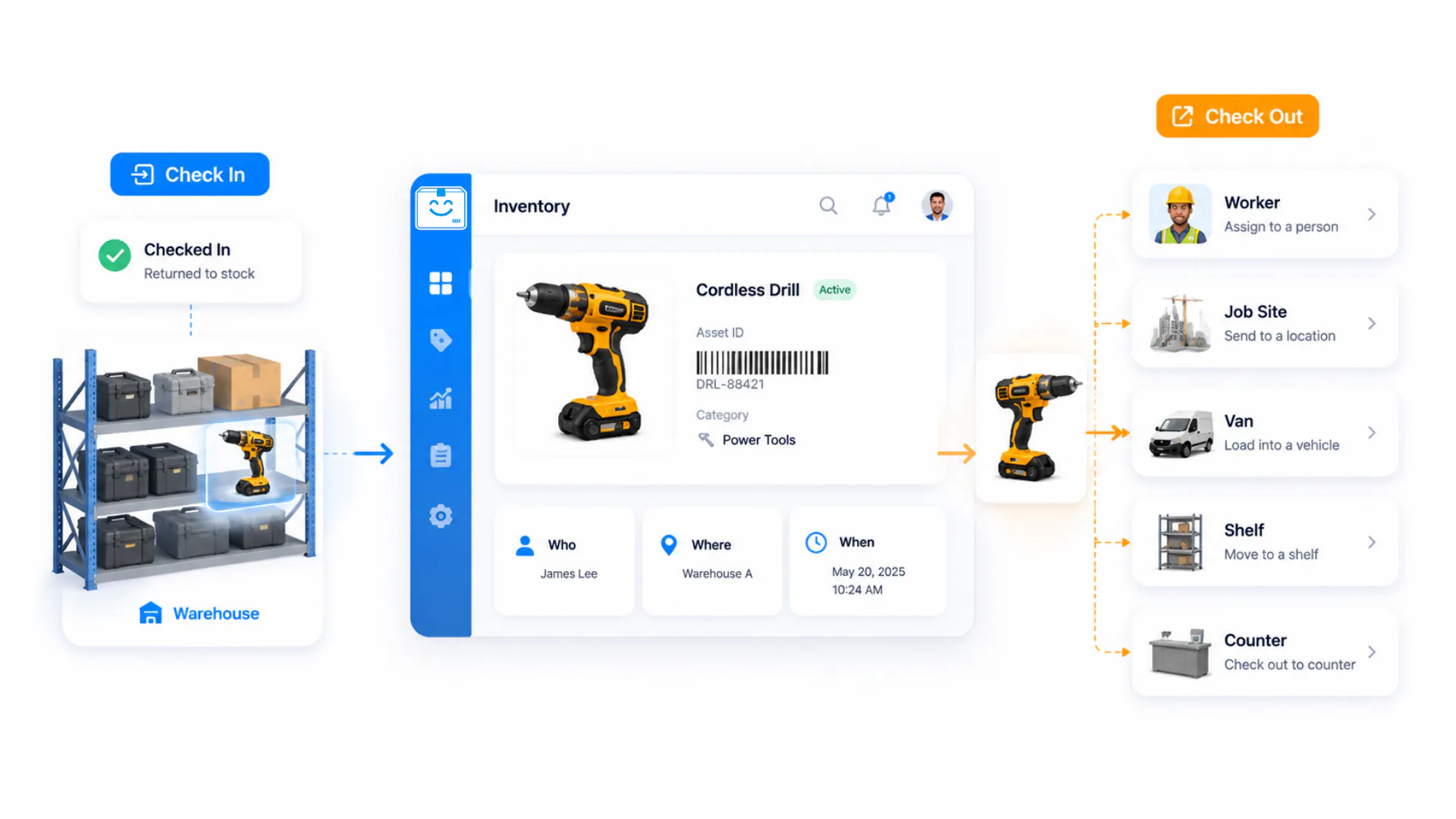
Check in check out software replaces the paper sign-out sheet that nobody keeps up to date: scan an asset, assign it to a person, crew, job, or location, and StockZip records who has it, when it left, and when it is due back. It is the equipment check in check out software your team actually keeps current, because a scan is faster than a clipboard.

Start freeSee pricing

Free forever for 100 items · no credit card · check-in / check-out on the Starter plan
stockzip.app
StockZip check-in / check-out screen showing assets assigned to team members with due dates

The Assignments view groups every checked-out item by who has it, so “I thought you had it” stops being a daily conversation.

Three steps, no setup project

How it works

01 · Choose the borrower

Pick the person, crew, job, or location that should be responsible for the item, so every assignment is tied to a name — not a guess.

02 · Scan the asset and set a due date

Scan the barcode or QR code to open the right record, then check it out with an optional due date and note so custody and the expected return are on record.

03 · Scan it back in

When the item returns, scan it to close the checkout. The return is added to the append-only activity trail, and you can add a condition note if anything came back damaged or missing.

Everything you need in one place

Who has what, at a glance

The Assignments view shows every currently checked-out item grouped by person. Search any item to see its current holder and full custody history — no sign-out sheet to hunt for.

Due dates and overdue views

Set an expected return date at checkout, then use overdue views and supported notifications to follow up on the items that have not come back on time.

Equipment check in check out for any asset

The same workflow suits construction tools, IT laptops, AV and production gear, medical devices, and keys or access cards — anything reusable that moves between people.

Full custody trail

Every assignment is logged with timestamp, user, and device in an append-only history, giving managers a reliable record for accountability and follow-up.

Check-in condition notes

Record condition changes, missing parts, or follow-up work during check-in, so damage and repairs stay attached to the item’s history.

Multi-site folders

Organise equipment pools by site as folders and transfer items between them with full tracking, so a tool that moves between locations stays accounted for.

Frequently asked questions

What is check in check out software?
Check in check out software tracks who has which asset. A team member scans an item to check it out under their name, and scans it again to check it back in. StockZip logs every transaction with who, what, when, and where — replacing paper sign-out sheets with an auditable custody record.
How does checking an item out work?
Choose the person or crew from your roster, scan the item barcode or QR code, and confirm. The item is now assigned to that borrower with a timestamp, keeping the checkout record current without a paper sign-out sheet.
How do I see who has which items?
The Assignments view shows all currently checked-out items grouped by person. You can also search any item to see its current assignment and full custody history, and filter by location or date range.
Can I set a due date and catch overdue items?
Yes. Set an expected return date during checkout, then use overdue views and supported notifications to follow up on items that have not come back on time.
Does equipment check in check out work across multiple sites?
Yes. Organise equipment pools by site as folders, transfer items between folders, and review consolidated activity across your whole organisation, so a tool that moves between locations stays accounted for.
Which plan includes check-in / check-out?
Check-in / check-out is on the Starter plan ($16.99/month, or $14.99/month billed annually) and up — it is not part of the Free plan. Free covers inventory tracking, scanning, and low-stock alerts; Starter adds check-in / check-out for your whole team.

Keep exploring

All features →

Set up your inventory in an afternoon

Free for 100 items, no credit card, and your signup price is your renewal price.

Start freeSee pricing
Free for 100 items
No credit card
Start free