Free Inventory Spreadsheet
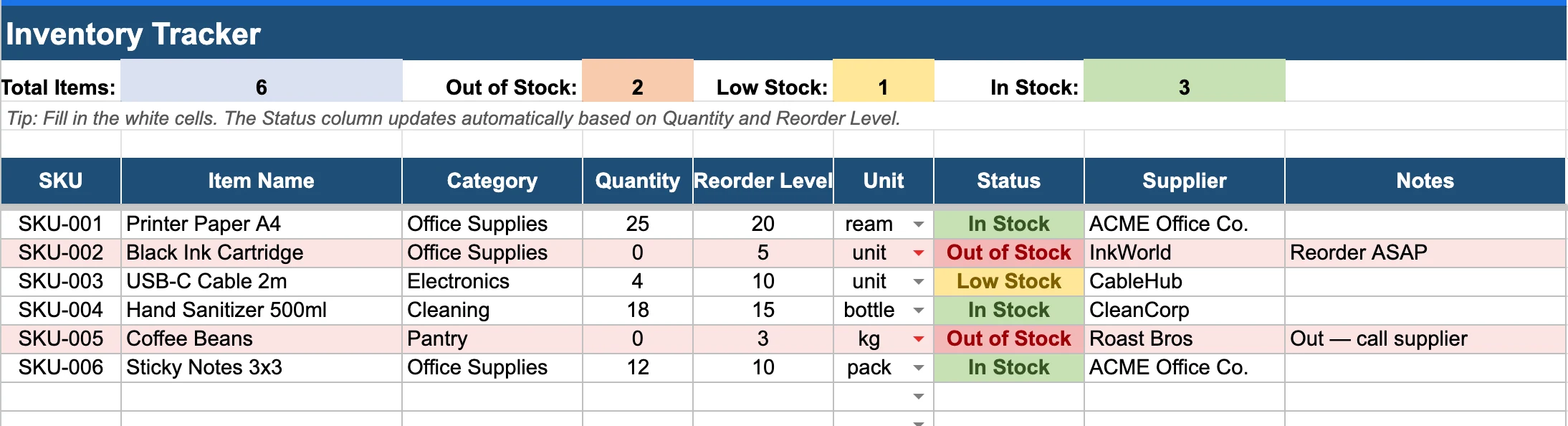
StockZip made this free Excel template so you can start tracking inventory today. Nine columns, a Status column that auto-updates In Stock / Low Stock / Out of Stock, and a live dashboard at the top that counts everything for you. Prefer to skip spreadsheets entirely? StockZip is the alternative.
Get the spreadsheet
Excel (.xlsx) — opens in Excel, Numbers, or Google Sheets. No email, no signup.
What's in the template
Nine columns, pre-formatted with sample rows. The Status column updates itself from your Quantity and Reorder Level. A live dashboard at the top tracks Total Items, In Stock, Low Stock, and Out of Stock as you edit.
| Column | Description | Example |
|---|---|---|
| SKU | Unique identifier for each item | SKU-001 |
| Item Name | Short, recognizable name | Printer Paper A4 |
| Category | Group items into product types | Office Supplies |
| Quantity | Current stock on hand | 25 |
| Reorder Level | Quantity that triggers a reorder | 20 |
| Unit | Unit of measure | ream |
| Status | Auto-fills as In Stock / Low Stock / Out of Stock based on Quantity vs Reorder Level | In Stock |
| Supplier | Vendor or manufacturer | ACME Office Co. |
| Notes | Anything else worth tracking | Reorder ASAP |
How to use it
Open the file
The .xlsx opens directly in Excel, Numbers, or Google Sheets (File → Import).
Tailor the columns
Delete columns you do not need. Add your own for any custom field — serial numbers, lot codes, expiry dates.
Enter your stock
Replace the sample rows with your real items — one row per SKU. The Status column and the dashboard counts at the top update on their own as you type.
Keep it current
Set a regular cadence — daily for fast movers, weekly for everything else. The longer you wait, the harder reconciliation gets.
Rather skip the spreadsheet?
Spreadsheets work for a few hundred SKUs. Past that — or if you'd rather not deal with them at all — here's where they get painful:
- Every update is manual, every typo lives forever
- No barcode scanning — keyboards only
- Two people editing at once breeds conflicting copies
- Nothing warns you before you run out
- No history of who changed what, or when
- Formulas silently break the moment columns move
StockZip is the alternative — same tracking job, none of the spreadsheet maintenance.
Try StockZip instead of the spreadsheet
Same tracking, none of the manual work. Already started in Excel? Import this file directly — every column maps over.
- Scan barcodes from your phone — no typing
- Low-stock alerts before you run out
- Full audit trail — every change, every user
- CSV/XLSX import in minutes — map fields once, done