Barcode Inventory System for Small Business
Label your items, scan with a phone, and every stock movement records itself. No typing, no spreadsheet drift, no scanner hardware required to start.
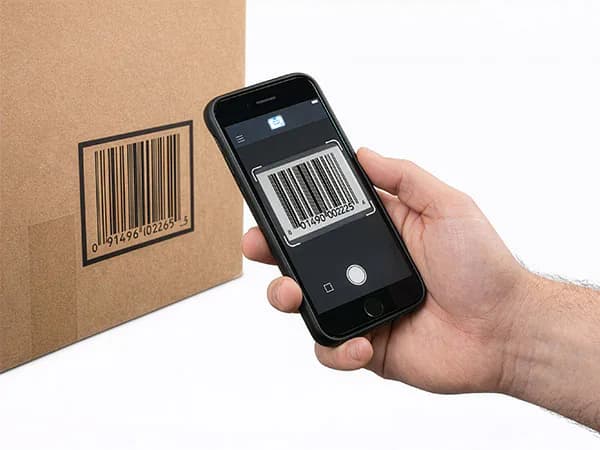
Scan result
Qty updated in 2 seconds
Audit trail
Every scan recorded
What is a barcode inventory system?
A barcode inventory system tracks stock by giving every item or bin a scannable label — a barcode or QR code — and recording every stock movement with a scan instead of manual data entry. When someone receives, moves, sells, or checks out an item, they scan its label and the software updates the quantity, location, and history automatically. The result is accurate, real-time stock levels and a complete audit trail of who moved what, when, and where.
Modern systems like StockZip run entirely on a phone: the camera is the scanner, labels print from the app, and everything works offline. That removes the two traditional barriers — hardware cost and setup complexity — that kept barcode systems out of small businesses. Most teams go from inventory spreadsheets to scanning in a day.
How a barcode inventory system works
Three steps — and the third one runs itself.
Label your items
Use the UPC/EAN barcodes already on products, or generate QR labels in StockZip and print them on a thermal or laser printer for tools, bins, and shelves.
Scan to update stock
Point a phone (or Bluetooth scanner) at the label. Check items in or out, adjust quantities, or move them between locations — no typing, no lookup.
Track everything automatically
Every scan writes the audit trail: who, what, when, where. Stock levels, low-stock alerts, and counts stay accurate because updates happen at the shelf.
Full walkthrough: How to set up a barcode inventory system · Using QR codes for inventory
The whole system is three parts — you already own the first
Scanner: your phone
iPhone or Android camera scanning built in. Add a $30–$150 Bluetooth scanner later only if you need all-day speed.
Labels: printed or existing
Read existing UPC/EAN retail barcodes, or print QR/barcode labels from StockZip. Weather-resistant options for outdoor use.
Software: one source of truth
Items, quantities, locations, photos, and history in one place — synced across every phone and the web dashboard.
Barcode inventory software vs spreadsheets
| Task | Spreadsheet / paper | Barcode system (StockZip) |
|---|---|---|
| Recording a stock movement | Type into a cell, later, from memory | Scan at the shelf, instantly |
| Accuracy | Drifts with every manual entry | Scan-verified at the point of action |
| Who changed what | Unknown | Every scan logged with user + timestamp |
| Stock counts | Hours with a clipboard | Walk, scan, done — discrepancies flagged |
| Low stock | Noticed when the bin is empty | Automatic alerts at your reorder point |
| Works in the field | Needs a laptop | Offline-first on any phone |
Pricing is simple: free for 100 items and 1 user, then from $14.99/month billed annually. No per-scan or per-SKU fees.
Where teams use barcode inventory tracking
Warehouse inventory
Learn moreTool tracking
Learn moreEcommerce stock
Learn moreCheck-in / check-out
Learn moreWant the feature-level detail? See barcode scanning in StockZip
Barcode inventory system questions
Straight answers about scanners, labels, cost, offline use, and getting started.
A barcode inventory system is a way of tracking stock where every item or storage bin carries a barcode or QR label, and every stock movement is recorded by scanning that label instead of typing. Scanning eliminates manual data entry, so counts stay accurate and every check-in, check-out, and transfer is logged automatically with who did it and when.
Scan your first item in the next ten minutes
Import your item list, print labels for anything without a barcode, and start scanning. Free for 100 items — no credit card, no scanner hardware.