
What is StockZip?
StockZip is barcode-based inventory management software and a mobile inventory app built for small businesses with real physical stock to manage. Teams use a phone or Bluetooth scanner to check items in and out, track stock across multiple locations, and get low-stock alerts — replacing spreadsheets and paper logs with simple stock management. StockZip works offline-first, making it a reliable inventory tracking app for warehouses, vans, and job sites. Try Pro free for 14 days, then fall back to Free for 10 items if you do not upgrade; paid plans start from $15/month billed annually.
Your Entire Inventory, Right in Your Pocket
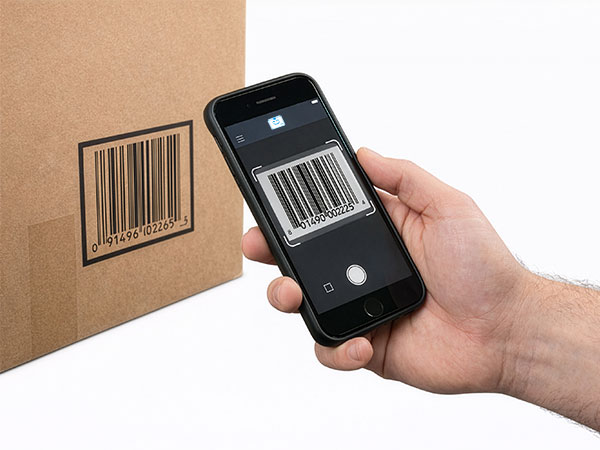
StockZip is the mobile inventory management app for small teams. Snap a photo, scan a barcode, and you're tracking stock, tools, parts, and supplies — from the phone in your pocket.
Try everything free for 14 days · no credit card · keep a free plan forever






Scan. Update. Done.
No handheld scanner to buy, no SKUs to type. The camera on the phone you already own runs the whole barcode scanning loop.


No training required
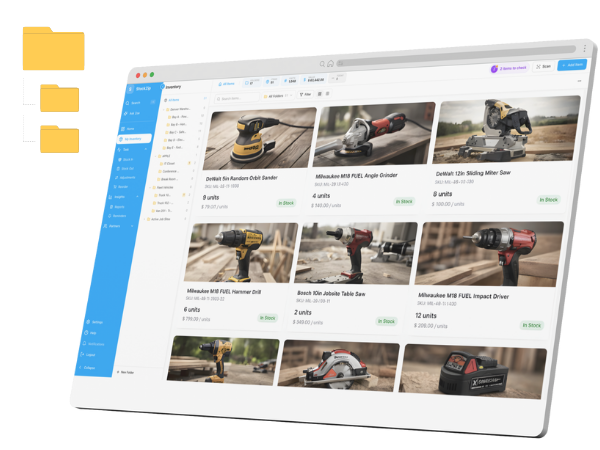
If you can use the folders on your phone, you already know StockZip. Organize your inventory the way the real world is organized — warehouse → shelf → bin — and your staff picks it up in minutes, not weeks.
Label it once, scan it forever
Turn any item into a scannable label in seconds with our free barcode & QR label generator. Pick a size, choose what shows, and print asset tags and labels — a full Avery sheet or a single thermal-roll label.
Find any item in seconds
Search-first navigation — filter by location, tag, or stock status.
Retire the spreadsheet.
Keep your columns.
Import the sheet you already keep, Quick Add anything new, then learn how to set up a barcode system when you're ready to scan every item.
Import the sheet you have
Drag in the sheet you already keep. Columns become custom fields, tabs become folders — SKUs, quantities, and min levels come along untouched.
Quick Add everything else
Type or paste a list — one item per line, add a comma for the starting count. Up to 100 items land in one tap; details can come later.
The conversation lives on the item
Every item, order, and count has its own thread. @mention a teammate and they're pinged instantly — no more "which cable?" texts lost in group chats.

Always know who took what
Assign items to a person or job in one tap. Every check-in / check-out, return, and edit is stamped with a name and a time — a complete audit trail you can export whenever you need it.
Trace every serial.
Recall any batch.
Construction and field-service crews give every tool a serial number and follow it from receiving to repair to return. Restaurants, pharmacies, and light manufacturers track consumables by lot and expiry — StockZip picks the oldest batch first, flags what's expiring, and pulls up every unit of a recalled lot in seconds.

Order in. Invoice out.
Nothing typed twice.
The sales order becomes the pick list, the pick becomes the delivery, the delivery becomes the invoice — each step of this order-to-cash workflow carries the last one's data and moves stock as it goes. The paperwork closes itself, and every document downloads as a branded PDF.
See Pro features06 · Intelligence
Ask Zoe. Know instantly.
Zoe is StockZip's built-in assistant. Ask about stock in plain language and get the answer instantly — across every location.
Meet ZoeYou have 84 in total — below your reorder point of 100.
Connects to the tools you already run
Native integrations keep sales, accounting, and AI in lockstep with your shelves — no re-keying, no exports.
Every paid order decrements stock the moment it happens. Storefront and shelf never disagree — across every location.
Invoices, purchase orders, and COGS will flow straight into QuickBooks — nothing entered twice.
Ask your inventory anything — from ChatGPT or Claude
Connect ChatGPT or Claude to StockZip with secure OAuth. Find items, review low stock, check stock in or out, correct counts, and move items with live data from your own workspace.
Two items, based on current burn rate — via StockZip MCP:
Want me to draft the PO?
Spreadsheets got you here.
They won't get you further.
The honest comparison against the two things small teams actually use today.
How small teams win
"Very user friendly. Easy to stock in and out." After switching from spreadsheets, WCWL tracks every router serial number for installation and warranty claims — and recovered thousands in inventory that used to go missing.
Predictable pricing.
No surprise tier jumps.
- ✓Barcode & QR scanning
- ✓Folder organization
- ✓Low-stock alerts
- ✓Check-in / check-out
- ✓Reports & full audit log
- ✓Custom fields & labels
- ✓Stock counts
- ✓Everything in Starter
- ✓Sales orders → pick → deliver → invoice
- ✓Purchase orders & receiving
- ✓Lot & serial tracking, POS mode
- ✓Everything in Pro
- ✓SSO & webhooks
- ✓Dedicated account manager
Prices in USD.